¶ Bootloader
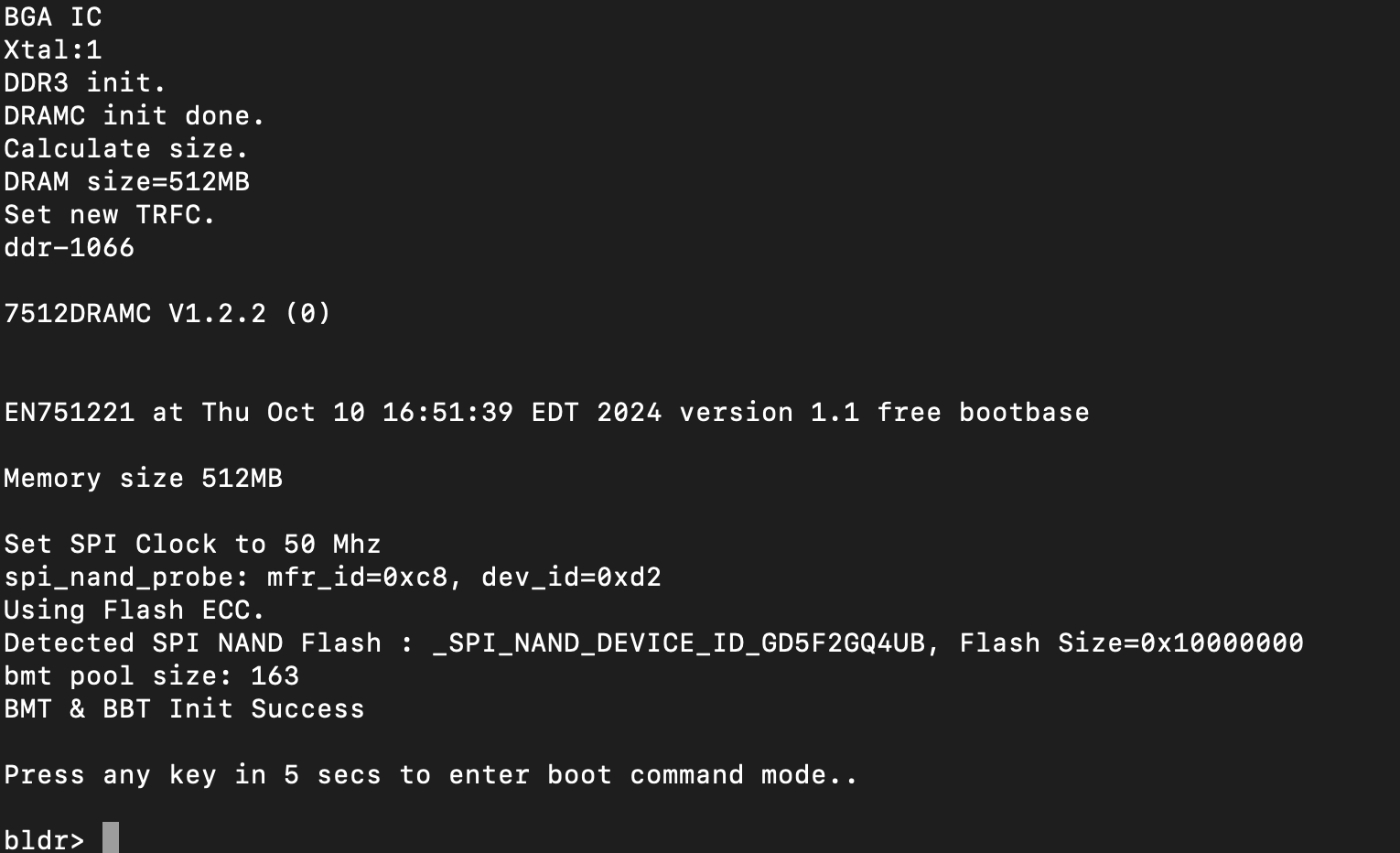
TcBoot is a minimalist bootloader derived from TrendChip's TC3262. It is unfortunately also something that is often patched and modified by vendors, so its behavior is not always the same.
You can stop the bootloader from UART by pressing enter in the first seconds of device startup, it will leave you with a command prompt bldr>.
¶ Uploading Data with XMODEM
TcBoot does not have TFTP capability, but it does come with a command xmdm which allows loading a binary into memory over UART.
To use xmdm, you need to enter the memory location where to load the data and the length of the binary in hexadecimal. Below are the steps to upload data using XMODEM with TcBoot:
-
Make sure you have the necessary components
You'll need a serial terminal with XMODEM support.- On Debian:
apt install picocom lrzsz
- On Debian:
-
Prepare the binary file:
- Ensure you have the binary file you want to upload (e.g., a kernel image, firmware, or other data) ready on your host machine.
-
Determine the file length in hex:
- Calculate the size of the file in bytes and convert it to hexadecimal. On Linux, use:
printf '%X\n' "$(stat -c%s your-binary-file)" - Example: For a file
mybinary.binthat’s 7,304,096 bytes, this outputs6f73a0. Note this value for later.
- Calculate the size of the file in bytes and convert it to hexadecimal. On Linux, use:
-
Set Up a terminal with XMODEM support:
- Connect to the device over UART using a terminal program with XMODEM capability. For example, with
picocom:picocom --send-cmd "sx -vv" -b 115200 /dev/ttyUSB0 - Replace
/dev/ttyUSB0with your serial device. The--send-cmd "sx -vv"sends using lrzsz in verbose mode).
- Connect to the device over UART using a terminal program with XMODEM capability. For example, with
-
Access the TcBoot bootloader:
- Power on the device and press any key within 3 seconds to stop the bootloader and enter command mode:
Press any key in 3 secs to enter boot command mode. ................... - You’ll see the bootloader prompt after login.
- Power on the device and press any key within 3 seconds to stop the bootloader and enter command mode:
-
Log In to the bootloader:
- Depending on the firmware, you may have a login prompt. If so, the username and password should be
telecomadmin/nE7jA%5mUserName: telecomadmin Password: nE7jA%5m bldr>
- Depending on the firmware, you may have a login prompt. If so, the username and password should be
-
Prepare the
xmdmcommand:- Type the XMODEM receive command with the memory address and file length (don’t press enter yet):
xmdm 80020000 <file-length-hex> - The first arg is where to load the binary in RAM, normally you should use
80020000which is the beginning of usable memory. <file-length-hex>: The hex value from Step 2 (e.g.,6f73a0).- Example:
xmdm 80020000 6f73a0
- Type the XMODEM receive command with the memory address and file length (don’t press enter yet):
-
Copy the filename:
- Copy the path to your binary file (e.g.,
mybinary.bin) to your clipboard for quick pasting in the next step.
- Copy the path to your binary file (e.g.,
-
Start the XMODEM Transfer:
- Press Enter to execute the
xmdmcommand. The bootloader will wait for the XMODEM transfer, showingCCCC:bldr> xmdm 80020000 786630 CCCC - Quickly initiate the XMODEM send from your terminal:
- In
picocom: PressCtrl+A, thenCtrl+S, paste the filename (e.g.,mybinary.bin), and press Enter. - Example terminal output:
*** file: mybinary.bin
$ lsx -vv mybinary.bin
Sending mybinary.bin, 61644 blocks: Give your local XMODEM receive command now.
- In
- The transfer should start, showing progress (e.g., byte counts). If it doesn’t begin within a few seconds, wait 30-60 seconds for the prompt to return and retry Steps 6-8.
- Press Enter to execute the
-
Use the uploaded data:
- Depending on your goal, proceed with TcBoot commands:
- To flash a trx file:
flash <flash-address> 80020000 <file-length-hex>(e.g.,flash 80000 80020000 786630). - To execute a kernel:
jump 80020000
- To flash a trx file:
- Depending on your goal, proceed with TcBoot commands:
¶ A/B Partitioning
Many EcoNet devices use A/B partitioning, meaning there are two copies of the operating system stored in separate flash partitions (A and B). This design ensures that if a power outage or failure occurs during an upgrade, the device remains bootable from the unaffected partition, preventing it from becoming bricked. The selection of which partition to boot from is typically controlled by a boot flag stored in flash memory, with the exact mechanism and flash layout varying by device model and flash chip size.
¶ Switching OS from the bootloader
If you know the location of the boot flag, you can modify the boot flag directly from the TcBoot bootloader. TP-LINK DEVICES USE A DIFFERENT FLAG, THIS DOES NOT WORK
-
Enter the Bootloader:
- Power on the device and interrupt the boot process (e.g., press a key within 3 seconds) to access the TcBoot prompt.
- Log in if necessary
-
Set the boot flag in memory:
- For booting to partition A
memwl 80020000 30000000 - For booting to partition B
memwl 80020000 31000000
- For booting to partition A
-
Commit to flash:
- Write the memory contents to the flash region storing the boot flag:
flash <flash-address> 80020000 01 <flash-address>: The flash location for the boot flag (differs per device).
- Write the memory contents to the flash region storing the boot flag:
-
Reboot:
- Restart the device to boot from the selected partition:
go- Or power cycle manually.
- Restart the device to boot from the selected partition:
¶ BBT/BMT
Devices with NAND flash use a Block Mapping Table to handle bad blocks. This is relevant to anything which mounts an FS on the device because you must implement the same BMT logic or else the data you write may not be seen, or may even be overwritten by the bootloader.
More information in BBT/BMT.
¶ A-length bug
Many versions of the bootloader have a bug in which the kernel length used for the purpose of unpacking is always taken from kernel A, no matter whether it is trying to boot kernel A or kernel B.
The bug is visible in the GPL code, as you can see the kernel length is read on line 1156 kernel_size = READ_FLASH_DWORD(temp_addr) + 0x100; but the selection of kernel A or B is only made later here flag = readBootFlagFromFlash(); on line 1181.
The impact of this is if OS_B is longer than OS_A, it will not boot correctly. If it is the same length or shorter, it will have no problem.
Since a modern OpenWrt kernel is always larger than the old 2.6.36 kernel used in vendor code, an initial installation in Slot B causes a failure to boot.
A PR to OpenWrt has been proposed to create a stub chain-loader which then loads the actual kernel.
¶ Available bootloader commands
All size arguments must be unprefixed hex values, for example if the memory location is 0x80020000, you write 80020000, if the length is 256, you write 100.
| Command | Description | Notes |
|---|---|---|
?, help |
Print out help messages. | |
go |
Boot the Linux kernel. | Loads from flash and then boots |
decomp |
Decompress kernel image to RAM. | |
memrl <addr> |
Read a word from address. | |
memwl <addr> <value> |
Write a word to address. | |
dump <addr> <len> |
Dump memory content. | |
jump <addr> |
Jump to address. | |
flash <dst> <src> <len> <oob> |
Write to flash from source to destination (oob: write NAND OOB if 1). | |
imginfo |
Show image information. | |
spinand_rwtest |
Flash test. | |
bdstore <flash dst> <bin src> |
Perform backdoor config store. | Not supported on NAND devices |
bdshow |
Show backdoor config. | Not supported on NAND devices |
bdswitch [1|0] |
Enable or disable backdoor function. | Not supported on NAND devices |
ddrcalswitch [1|0] |
Enable or disable DDR calibration function. | |
drambistswitch [0|1|2] |
Disable or enable DRAM BIST (0=disable, 1=quick, 2=normal). | |
xmdm <addr> <len> |
Xmodem receive to address. | Extremely useful for loading in data to boot directly or to flash |
miir <phyaddr> <reg> |
Read Ethernet PHY register. | |
miiw <phyaddr> <reg> <value> |
Write Ethernet PHY register. | |
cpufreq <freq num> / <m> <n> |
Set CPU frequency (156~450 MHz, must be multiple of 6). | |
ipaddr <ip addr> |
Change modem's IP address. | |
httpd |
Start web server. | Never able to make this work |